
When it comes to online advertising, few platforms can match the reach and precision of Google Ads. With billions of searches taking place every day and countless users interacting with Google-owned platforms like YouTube, Gmail, and the Google Play Store, the opportunity to connect with potential customers is enormous. But to unlock this potential, businesses first need to understand the different types of Google Ads available and how they compare in the debate of Google Ads vs Facebook Ads
Google Ads—once known as Google AdWords—has grown far beyond simple text ads on search results. Today, there are multiple Google Ads campaign types designed to serve different goals, audiences, and placements. From classic search ads that capture high-intent users to display ads that build awareness across the web, to advanced options like Performance Max campaigns that leverage Google’s AI, each ad format offers unique benefits.
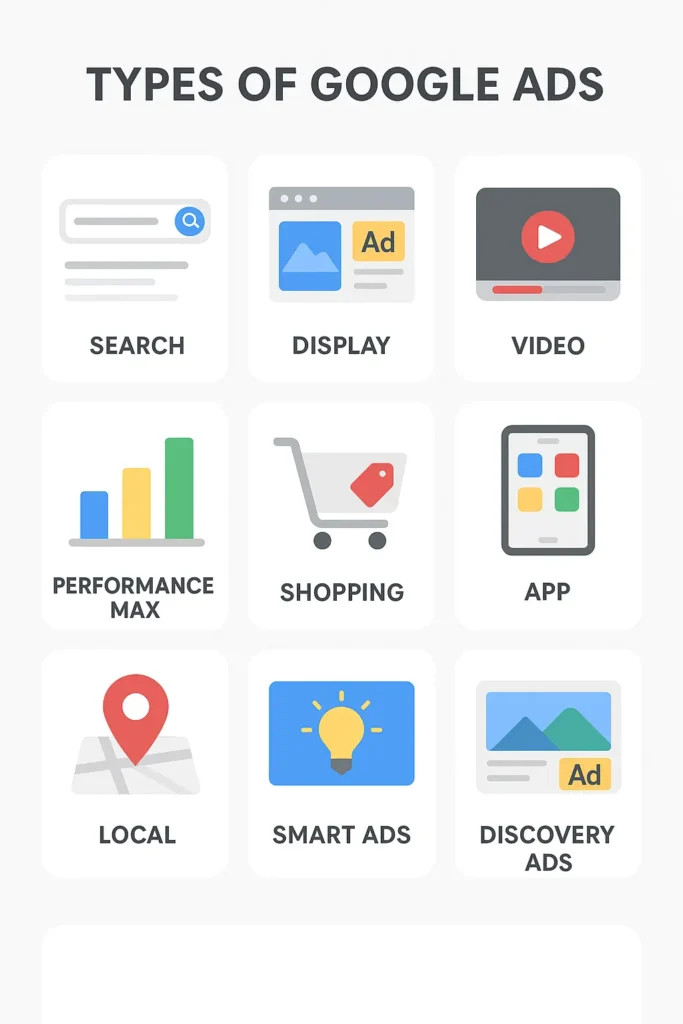
The variety can feel overwhelming at first, especially if you’re new to online advertising. Should you focus on driving direct sales with shopping ads, boost video visibility on YouTube with video campaigns, or reach local customers through local services ads? The answer depends on your goals, your audience, and how you want your brand to appear across Google’s vast network. Working with a trusted PPC company can help you choose the right approach and maximize results.
In this guide, we’ll cover all types of Google adwords explained in detail, including their placements, advantages, which types of google . Understanding the different types of Google Ads campaigns is the first step to creating a winning strategy.
Table of Contents
Types of Google ads Campaigns:
1. Search Ads

Where they appear: Google Search results pages (SERPs)
Best suited for: Capturing users actively searching for specific keywords
Cost model: Pay-per-click (PPC), varies by competition and keyword
Key features:
- Text-based format
- Reaches users with high purchase intent
- Triggered by real-time search queries
- Strong targeting options through keywords, location, and audience settings
What are Search Ads?
Search ads are the most recognizable and widely used type among the different types of Google Ads campaigns. These are text-based ads that show up at the top or bottom of Google’s search engine results pages whenever someone searches for a relevant keyword. They closely resemble organic search listings, often including a headline, display URL, description, and extensions like call buttons or sitelinks. This makes them a key example in the discussion of organic vs paid search, as they appear above or below organic results but are clearly marked as ads.
Because they appear at the very moment a user is searching for a product or service, search ads are highly effective for generating clicks and conversions. For example, someone searching for “photo editing software” might see multiple search ads before the first organic result, giving advertisers a prime opportunity to get noticed.
How do they work?
Placement of search ads is determined by a combination of your bid, competition, and Google’s Quality Score system. Quality Score takes into account:
- Expected click-through rate (CTR)
- Ad relevance to the user’s search intent
- Landing page experience
Advertisers with higher Quality Scores can often secure better positions at a lower cost, while low-quality ads may end up further down the page—even with a higher bid.
In short, search ads remain the foundation of most Google Ads campaigns types, offering a cost-effective and results-driven way to reach people at the exact moment they’re ready to act.
2. Display Ads
Where they appear: Across millions of websites, apps, and Google-owned platforms within the Display Network
Best suited for: Building brand awareness and reaching new audiences
Cost model: Pay-per-click (PPC) or cost-per-thousand impressions (CPM)
Key features:
- Visual ad formats (images, banners, or responsive ads)
- Access to over 35 million apps and partner websites
- Advanced targeting options, including demographics, interests, and remarketing
What are Display Ads?
Display Ads are a highly visual types of ads in Google Ads that appear while users browse content, rather than search for it. As one of the most common forms of paid ads, they allow businesses to reach potential customers even when they’re not actively searching.
If you’ve ever searched for a product online and then noticed its ad following you across different websites, you’ve already experienced the power of Google Display Ads. Unlike search ads that appear only when someone enters a query, display ads are shown proactively across Google’s vast Display Network (GDN), which includes platforms like YouTube, Gmail, and countless third-party sites and mobile apps.
These ads can appear as banners at the top of a webpage, image tiles in the sidebar, or even embedded within content. They are designed to be eye-catching and visual, using images, animations, or responsive designs that adjust to the available space.
Display Ads are excellent for boosting visibility and creating opportunities for brand collaboration with relevant audiences.
How do they work?
Google selects which display ads to show based on several factors, including:
- The content of the website or app
- The user’s browsing behavior and past interactions
- Audience segments chosen by advertisers, such as interests or remarketing lists
Because display ads appear while users are consuming content rather than actively searching, they generally have lower click-through rates than search ads. However, they excel at building brand visibility and keeping your business top-of-mind—like digital billboards that follow users across the internet. This types of google ads are an important component when exploring the different types of digital marketing, helping businesses engage audiences beyond search-based interactions.
3. Shopping Ads
Where they appear: Google Shopping tab, Search results pages (SERPs), Google Images, Google Maps, and partner search sites
Best suited for: Businesses selling physical products through Google Merchant Center
Cost model: Pay-per-click (PPC), varies by product category and competition
Key features:
- Includes product images, titles, prices, and ratings
- Automatically generated from Google Merchant Center feeds
- Visible across multiple Google properties and partner networks
What are Shopping Ads?
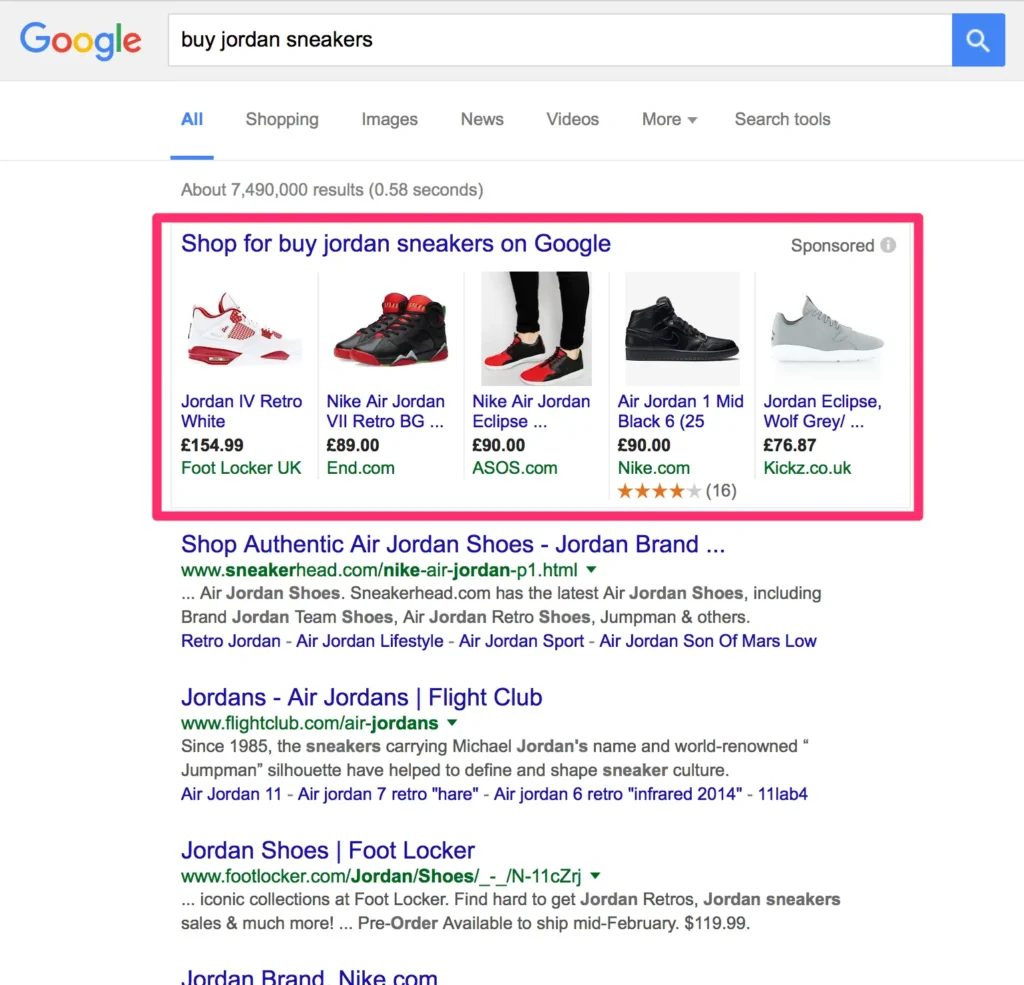
Shopping Ads are a visually rich types of Google Ads that showcase products directly within Google Search and Google Shopping.
Google Shopping Ads are designed specifically for eCommerce businesses and retailers. Unlike standard text-based search ads, these ads display rich product details such as an image, price, store name, and even promotions—making them highly appealing for users ready to buy.
Instead of writing ad copy from scratch, advertisers upload their product data into the Google Merchant Center, and Google automatically creates shopping ads based on that feed. This ensures ads are always up to date with the latest information, including stock availability, discounts, and reviews.
Where can they appear?
Shopping ads are versatile and show up in several locations across Google’s ecosystem:
- Search results (SERPs): Appear as a row of product images above or beside text ads.
- Google Shopping tab: Dedicated placement where shoppers can browse sponsored products.
- Google Images: Shown in product-related image searches.
- Google Maps: Local Inventory Ads highlight in-store availability when users search nearby.
- Partner sites: Appear across Google’s extended network of search partner websites.
4. Video Ads

Where they appear: Before, during, or after YouTube videos; in YouTube search results; on the YouTube homepage feed; and across the Google Video Partners network
Best suited for: Promoting products, services, or content using engaging video formats
Cost model: Pay-per-view (CPV) or cost-per-thousand impressions (CPM), depending on the format
Key features:
- Multiple ad formats for different campaign goals
- Can drive awareness, engagement, or direct conversions
- Extends reach beyond YouTube via partner sites and apps
What are Video Ads?
Video Ads are one of the most engaging types of Google Ads campaign that appear primarily on YouTube.
Video is one of the most powerful ways to capture attention, and YouTube—owned by Google—is the second-largest search engine in the world. Google Video Ads allow brands to tap into this massive audience by placing ads within YouTube content and across partner platforms.
Video ads are highly versatile and come in different formats, each serving a unique purpose. Depending on your campaign type, they can be skippable, non-skippable, short bumpers, or even premium placements at the top of YouTube’s homepage.
Formats of Video Ads
There are six main types of video ad formats available in Google Ads:
- Skippable in-stream ads – Play before, during, or after YouTube videos. Users can skip after 5 seconds. No maximum length.
- Non-skippable in-stream ads – Limited to 20 seconds and must be watched in full before the video resumes.
- In-feed video ads – Appear in YouTube search results, on the homepage, or alongside related videos.
- Bumper ads – Short, non-skippable ads of up to 6 seconds, ideal for quick brand messaging.
- Outstream ads – Mobile-only video ads that run on Google’s video partner sites and apps outside of YouTube.
- Masthead ads – Premium placements at the top of YouTube’s homepage feed, designed for maximum visibility.
Why use Video Ads?
Unlike static formats, video campaigns let businesses tell a story, demonstrate products, or showcase brand personality. With precise targeting options—such as demographics, interests, and remarketing—advertisers can reach highly relevant audiences while they’re actively engaged with video content.
5. App Ads
Where they appear: Google Play Store search results, Play Store suggestions, Google Search results pages (SERPs), YouTube feeds, Google Discover, and across Google’s partner network
Best suited for: Driving app installs, increasing app engagement, or promoting upcoming apps (primarily Android)
Cost model: Pay-per-install (CPI) or cost-per-action (CPA), depending on campaign goal
Key features:
- Designed specifically for mobile app promotion
- Targets both new users and existing users
- Campaigns optimized for installs, engagement, or pre-registration
What are App Ads?
Google App Campaigns are tailored for businesses that want to promote mobile applications. Instead of designing individual ads, advertisers provide basic text, audience preferences, and a budget. Google then uses data from the app’s Play Store listing—such as images, ratings, and descriptions—to automatically generate and test ad variations.
This automation ensures that the most effective ad layouts are shown to the right users across different placements. App Ads are a key part of Google Ads campaign types for mobile-first businesses
Types of App Campaigns
There are three primary formats of app ads based on campaign objectives:
- App Install Campaigns – Encourage new users to download your app directly from the Play Store or search results.
- App Engagement Campaigns – Target people who already have your app installed, prompting them to take specific in-app actions (like completing a purchase or reaching a new level).
- App Pre-registration Campaigns – For upcoming apps (especially mobile games), these campaigns allow users to pre-register on the Play Store before the official launch.
6. Discovery Ads
Where they appear: Google Discover feed, YouTube homepage and Watch Next feeds, Gmail Promotions and Social tabs
Best suited for: Reaching high-intent users with visually rich, personalized ads
Cost model: Pay-per-click (PPC) or cost-per-thousand impressions (CPM)
Key features:
- Uses AI and machine learning to optimize ad delivery
- Supports multiple images and creative assets
- Designed for visually engaging, intent-based targeting
What are Discovery Ads?
Google Discovery Ads are one of the innovative types of Google Ads campaigns designed to capture attention while users are browsing content rather than actively searching. These ads leverage Google’s advanced machine learning to deliver highly relevant, visually engaging campaigns based on audience intent signals and behaviors.
If you’ve scrolled through the Google Discover feed on mobile, opened Gmail’s Promotions tab, or browsed YouTube’s homepage, you’ve likely encountered discovery ads. They blend seamlessly into these environments, showing as image-rich cards with headlines, descriptions, and CTAs that resemble organic content.
Discovery campaigns target users closer to the purchase phase, making them one of the most effective types of ads in Google Ads for awareness and consideration.
How do Discovery Ads work?
Advertisers upload creative assets such as images, logos, headlines, and descriptions. Google then automatically tests different combinations across its surfaces, serving the versions most likely to drive results based on your bidding strategy and conversion goals.
7. Local Services Ads
Where they appear: Google Search results (SERPs) and Google Maps
Best suited for: Local businesses offering services in specific geographic areas
Cost model: Pay-per-lead (rather than per click or impression)
Key features:
- Connects customers directly with local service providers
- Appears at the very top of local search results
- Includes trust-building Google badges (Screened, Guaranteed, Licensed)
What are Local Services Ads?
Local Services Ads are one of the unique types of Google adwords campaign designed for businesses offering local services.
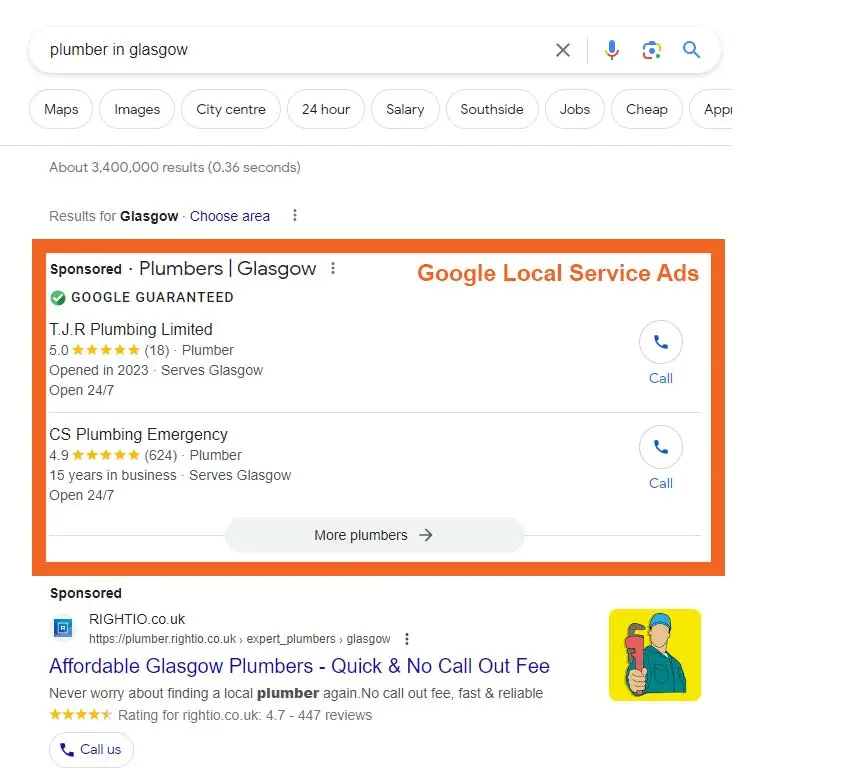
Local Services Ads (LSAs) are a specialized ad format designed for businesses that serve customers within a defined area—like plumbers, electricians, cleaners, real estate agents, and other local service providers. While they don’t run directly through the core Google Ads dashboard, they function as one of the most valuable types of Google Ads campaigns for localized lead generation.
To qualify, businesses must meet Google’s requirements, which include license verification, background checks, and sometimes proof of insurance. In return, advertisers may earn trust badges that reassure customers:
- Google Screened – A green checkmark for businesses that pass license and background checks.
- Google Guaranteed – A badge with a $2,000 Google-backed service guarantee (in select regions).
- License Verified by Google – For health providers with verified qualifications.
- Pre-Badge – For businesses that are in the early stages of verification.
Why use Local Services Ads?
LSAs appear above even standard search ads and organic listings, making them one of the most prominent placements on Google. When a user searches for services like “tree trimming near me” or “plumber near me” these ads are displayed at the top of results and in Google Maps.
8. Performance Max Ads
Where they appear: Across all Google advertising channels, including Search, Display, YouTube, Discover, Gmail, and Google Maps
Best suited for: Businesses looking for fully automated, goal-driven campaigns across multiple channels
Cost model: Pay-per-click (PPC), pay-per-conversion, or cost-per-thousand impressions (CPM), depending on campaign goals
Key features:
- Uses AI and machine learning to automatically optimize campaigns
- Delivers ads across all Google platforms without channel-specific setup
- Can identify new audiences and market segments based on real user behavior
What are Performance Max Ads?
Performance Max campaigns represent Google’s most advanced types of ads in Google Ads, using machine learning to optimize ads across all channels.
Performance Max campaigns are Google’s most advanced, automated campaign type, designed to maximize performance across every advertising surface it offers. Launched in late 2021, these types of google ads campaigns represent the future of Google Ads by allowing advertisers to run holistic campaigns without manually managing separate channel-specific ads.
Instead of deciding which type of ad to run on Search, YouTube, or Display, advertisers provide Google with creative assets—such as images, videos, headlines, descriptions, logos, and audience signals. Google then uses machine learning to automatically generate optimized ads and distribute them across all relevant platforms, targeting the users most likely to convert.
How do Performance Max Ads work?
Performance Max campaigns are goal-driven and considered one of the most effective types of Google Ads campaigns. Advertisers set conversion objectives like sales, lead generation, or website traffic and define their asset groups. Google then tests combinations of these assets in real time, learning which variations work best for each channel and audience. Over time, the system identifies new segments and surfaces ads to users who are most likely to take action.
Why use Performance Max Ads?
Because these campaigns span all Google Ads channels, they provide maximum reach while reducing the manual effort needed to manage multiple campaigns. Performance Max is particularly useful for businesses that want:
- A unified, cross-channel advertising strategy
- Automated optimization based on AI-driven insights
- Discovery of new customer segments and untapped opportunities
9. Smart Ads
Where they appear: Google Search results (SERPs), Google Maps, YouTube, Gmail, and search partner sites
Best suited for: Businesses looking to run goal-focused campaigns without managing separate channel-specific ads
Cost model: Pay-per-click (PPC) or cost-per-conversion, depending on campaign objectives
Key features:
- Centralized campaigns for cross-channel advertising
- Focuses on campaign-wide goals instead of individual channels
- Targets broader keyword themes rather than specific keywords
What are Smart Ads?
Smart Ads are designed to simplify cross-channel advertising while still leveraging automation. While they share some similarities with Performance Max campaigns, Smart Ads require slightly more manual setup, such as providing original ad copy, images, videos, audience preferences, keyword themes, and bidding strategies.
Once configured, Google automatically distributes these ads across multiple channels, including Search, YouTube, Maps, Gmail, and partner sites, ensuring your campaigns reach the right users without needing to create separate ads for each platform.
They serve as one of the goal-centric types of Google Ads campaign, allowing businesses to achieve objectives like website traffic, video views, or lead generation across multiple platforms without creating separate campaigns for each channel.
How do Smart Ads work?
Smart Ads function as centralized hubs for goal-driven campaigns. Instead of focusing on individual channels, advertisers prioritize objectives—like increasing website traffic, generating leads, or boosting video views. Google then uses automation to test variations, optimize delivery, and ensure ads perform efficiently across all eligible surfaces.
Choosing the Right Google Ads Campaign Types
Understanding all the different types of Google Ads campaigns is only half the battle. The key to a successful advertising strategy is selecting the right campaign type that aligns with your business goals, audience, and resources.
When to Use Different Types of Google Ads Campaigns
Each Google Ads campaign type serves a specific purpose:
- Search Ads: Best for reaching users actively searching for your products or services. Ideal for generating immediate leads or sales.
- Display Ads: Perfect for building brand awareness and engaging users who may not yet know your business. Great for retargeting previous visitors.
- Shopping Ads: Designed for eCommerce businesses. Use when you want to showcase product images, prices, and promotions to users ready to purchase.
- Video Ads: Ideal for increasing brand awareness, demonstrating products, or storytelling. Great for YouTube marketing.
- App Ads: Use to drive app installs, engagement, or pre-registrations. Works well for mobile-first businesses.
- Discovery Ads: Best for visually engaging campaigns that reach users across Gmail, YouTube, and the Discover feed.
- Local Services Ads: Perfect for businesses offering location-specific services, such as plumbers, electricians, or local retailers.
- Performance Max Ads: For businesses looking for automated, cross-channel campaigns that maximize conversions without managing separate campaigns.
- Smart Ads: Ideal for smaller businesses or advertisers who want goal-oriented campaigns with simplified automation across multiple Google platforms.
Understanding the different types of Google Ads campaigns ensures your budget is used efficiently, reaching the right audience with the right message at the right time.
Conclusion
Understanding the different types of Google adwords is essential for any business looking to grow online. From Search and Display ads to Shopping, Video, App, Discovery, Local Services, Performance Max, and Smart campaigns, each type offers unique advantages depending on your goals. Choosing the right campaign type can help you reach the right audience, maximize ROI, and drive meaningful results for your business.
Selecting the right types of Google Ads campaigns ensures your marketing budget is spent effectively, reaching the right audience at the right time and driving measurable results. By aligning your objectives with the appropriate types of ads in Google Ads, you can maximize conversions, boost brand awareness, and generate high-quality leads.
If you’re looking for expert guidance to create, manage, and optimize Google Ads campaigns, our digital marketing agency is here to help. Contact us today to develop a tailored strategy that drives growth and delivers measurable results.